> ## Documentation Index
> Fetch the complete documentation index at: https://docs.qoder.com/llms.txt
> Use this file to discover all available pages before exploring further.
# Deeplinks
Deeplinks 是一种基于自定义 URL 的跳转机制,允许从浏览器、文档、终端或其他外部环境直接唤起 Qoder Desktop,并打开指定页面或执行特定操作——例如发起一次聊天、创建 Quest 任务、导入规则或添加 MCP 服务配置。
对于涉及内容写入或配置导入的 Deeplinks,Qoder Desktop 会先弹出确认框供您审核,确认后才执行。部分 Deeplinks 需要先登录账号。
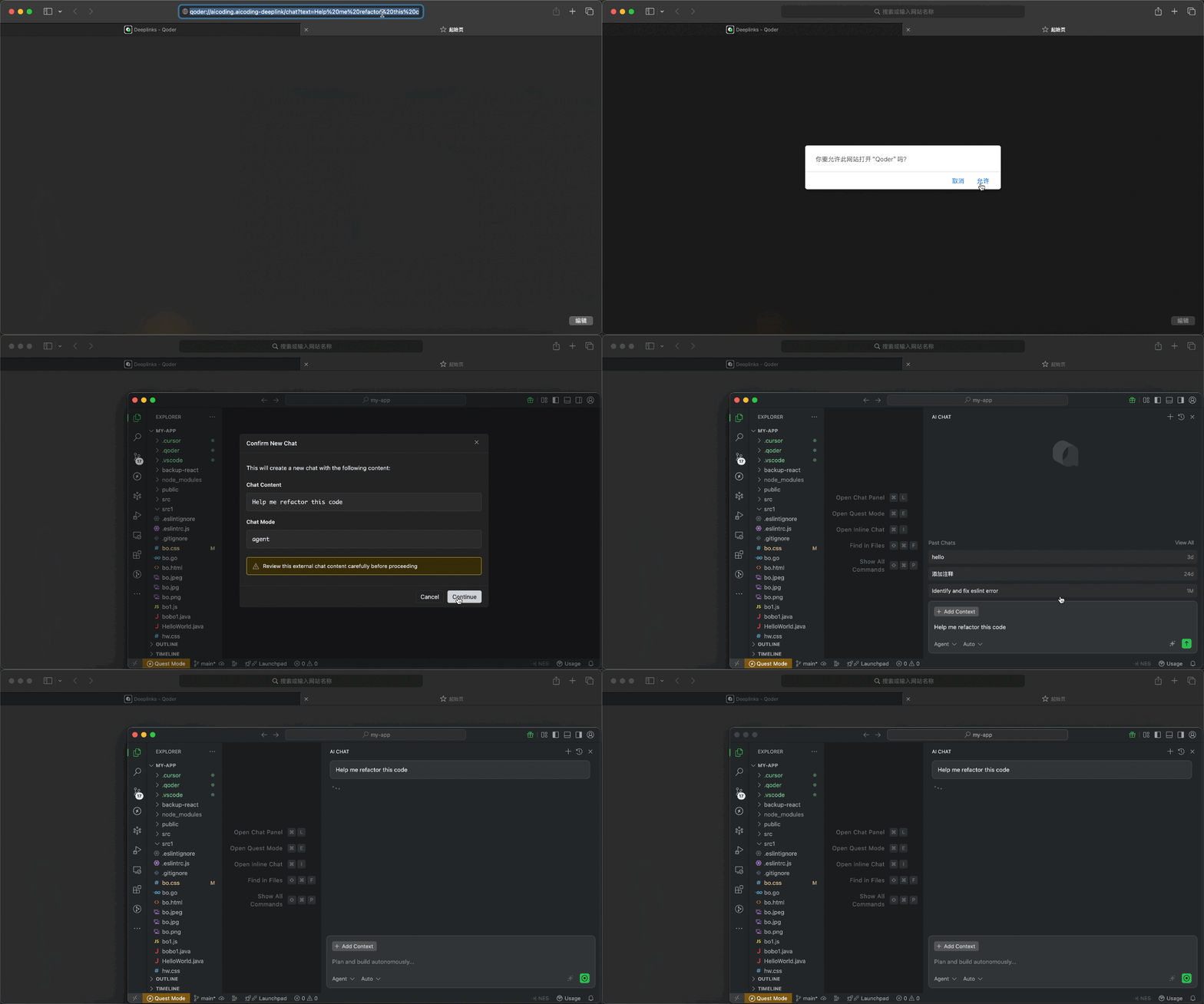
## URL 格式
```
{scheme}://{host}/{path}?{parameters}
```
| 组成部分 | 说明 | 示例 |
| ------------ | --------------- | -------------------------------------------------- |
| `scheme` | 协议 | `qoder` |
| `host` | Deeplinks 处理器标识 | `aicoding.aicoding-deeplink` |
| `path` | 操作路径 | `/chat`, `/quest`, `/rule`, `/command`, `/mcp/add` |
| `parameters` | URL 查询参数 | `text=hello&mode=agent` |
## 可用的 Deeplinks 类型
| 路径 | 说明 | 是否需要登录 |
| ---------- | ----------- | ------ |
| `/chat` | 创建智能会话 | 是 |
| `/quest` | 创建 Quest 任务 | 是 |
| `/rule` | 创建规则 | 否 |
| `/command` | 创建自定义命令 | 否 |
| `/mcp/add` | 添加 MCP 服务 | 否 |
***
## 创建智能会话 /chat
通过链接直接唤起一次聊天会话。打开链接后,Qoder Desktop 会先展示将要带入新会话的内容,确认后再创建新的聊天,并把文本预填充到输入框中而不自动发送。使用前需要先登录账号。
### URL 格式
```
qoder://aicoding.aicoding-deeplink/chat?text={prompt}&mode={mode}&isNewChat={isNewChat}
```
### 参数说明
| 参数 | 是否必需 | 说明 |
| ----------- | ---- | ------------------------------------------------------------------------- |
| `text` | 是 | 要预填充的提示内容 |
| `mode` | 否 | 聊天模式:`agent`、`ask`、`chat`,或在 Experts 开启时使用 `experts`。`ask` 实际按 `chat` 处理。 |
| `isNewChat` | 否 | 是否创建新聊天。默认 `true`;设为 `false` 时预填当前聊天。 |
### 示例
```
qoder://aicoding.aicoding-deeplink/chat?text=%E5%B8%AE%E6%88%91%E9%87%8D%E6%9E%84%E8%BF%99%E6%AE%B5%E4%BB%A3%E7%A0%81&mode=agent
```
### 生成链接代码
```typescript theme={null}
function generateChatDeeplink(text: string, mode?: 'agent' | 'ask' | 'chat' | 'experts', isNewChat?: boolean): string {
if (!text) {
throw new Error('缺少必需参数: text');
}
const url = new URL('qoder://aicoding.aicoding-deeplink/chat');
url.searchParams.set('text', text);
if (mode) {
url.searchParams.set('mode', mode);
}
if (isNewChat !== undefined) {
url.searchParams.set('isNewChat', String(isNewChat));
}
return url.toString();
}
// 示例
const deeplink = generateChatDeeplink('帮我重构这段代码以提升性能', 'agent');
console.log(deeplink);
// qoder://aicoding.aicoding-deeplink/chat?text=%E5%B8%AE%E6%88%91...&mode=agent
```
```python theme={null}
from urllib.parse import urlencode
def generate_chat_deeplink(text: str, mode: str = None, is_new_chat: bool = None) -> str:
if not text:
raise ValueError('缺少必需参数: text')
params = {'text': text}
if mode:
params['mode'] = mode
if is_new_chat is not None:
params['isNewChat'] = str(is_new_chat).lower()
return f"qoder://aicoding.aicoding-deeplink/chat?{urlencode(params)}"
# 示例
deeplink = generate_chat_deeplink('帮我重构这段代码以提升性能', 'agent')
print(deeplink)
```
***
## 创建 Quest 任务 /quest
打开或聚焦独立 Quest 窗口,并预填 New Quest 草稿。打开链接后,您可以先查看任务描述和执行模式,再决定是否继续。使用前需要先登录账号。
### URL 格式
```
qoder://aicoding.aicoding-deeplink/quest?text={description}&agentClass={agentClass}
```
### 参数说明
| 参数 | 是否必需 | 说明 |
| ------------ | ---- | -------------------------------------- |
| `text` | 是 | 任务描述 |
| `agentClass` | 否 | 执行模式:`LocalAgent`(默认)或 `LocalWorktree` |
#### 执行模式
| 模式 | 说明 |
| --------------- | --------------------- |
| `LocalAgent` | 在当前工作区执行 |
| `LocalWorktree` | 在隔离的 git worktree 中执行 |
### 示例
```
qoder://aicoding.aicoding-deeplink/quest?text=%E5%AE%9E%E7%8E%B0JWT%E7%94%A8%E6%88%B7%E8%AE%A4%E8%AF%81&agentClass=LocalWorktree
```
### 生成链接代码
```typescript theme={null}
type AgentClass = 'LocalAgent' | 'LocalWorktree';
function generateQuestDeeplink(text: string, agentClass?: AgentClass): string {
if (!text) {
throw new Error('缺少必需参数: text');
}
const url = new URL('qoder://aicoding.aicoding-deeplink/quest');
url.searchParams.set('text', text);
if (agentClass) {
url.searchParams.set('agentClass', agentClass);
}
return url.toString();
}
// 示例
const deeplink = generateQuestDeeplink('实现基于 JWT 的用户认证系统', 'LocalWorktree');
console.log(deeplink);
```
```python theme={null}
from urllib.parse import urlencode
def generate_quest_deeplink(text: str, agent_class: str = None) -> str:
if not text:
raise ValueError('缺少必需参数: text')
params = {'text': text}
if agent_class:
params['agentClass'] = agent_class
return f"qoder://aicoding.aicoding-deeplink/quest?{urlencode(params)}"
# 示例
deeplink = generate_quest_deeplink('实现基于 JWT 的用户认证系统', 'LocalWorktree')
print(deeplink)
```
***
## 创建规则 /rule
分享规则来指导 AI 行为。规则可以定义代码规范、项目约定或 AI 响应的特定指令。打开链接后,您可以先查看规则名称和内容,再决定是否导入;确认后会创建对应规则。
### URL 格式
```
qoder://aicoding.aicoding-deeplink/rule?name={ruleName}&text={ruleContent}
```
### 参数说明
| 参数 | 是否必需 | 说明 |
| ------ | ---- | ----------- |
| `name` | 是 | 规则名称(用作文件名) |
| `text` | 是 | 规则内容 |
### 示例
```
qoder://aicoding.aicoding-deeplink/rule?name=typescript-conventions&text=%E5%A7%8B%E7%BB%88%E4%BD%BF%E7%94%A8%E4%B8%A5%E6%A0%BC%E7%9A%84TypeScript%E7%B1%BB%E5%9E%8B
```
### 生成链接代码
```typescript theme={null}
function generateRuleDeeplink(name: string, text: string): string {
if (!name || !text) {
throw new Error('缺少必需参数: name 和 text');
}
const url = new URL('qoder://aicoding.aicoding-deeplink/rule');
url.searchParams.set('name', name);
url.searchParams.set('text', text);
return url.toString();
}
// 示例
const deeplink = generateRuleDeeplink(
'typescript-conventions',
`始终使用严格的 TypeScript 类型。
避免使用 'any' 类型。
对象类型优先使用 interface 而非 type。`
);
console.log(deeplink);
```
```python theme={null}
from urllib.parse import urlencode
def generate_rule_deeplink(name: str, text: str) -> str:
if not name or not text:
raise ValueError('缺少必需参数: name 和 text')
params = {'name': name, 'text': text}
return f"qoder://aicoding.aicoding-deeplink/rule?{urlencode(params)}"
# 示例
deeplink = generate_rule_deeplink(
'typescript-conventions',
"""始终使用严格的 TypeScript 类型。
避免使用 'any' 类型。
对象类型优先使用 interface 而非 type。"""
)
print(deeplink)
```
***
## 添加 MCP 服务 /mcp/add
通过链接快速添加 MCP (Model Context Protocol) 服务配置。MCP 服务通过提供额外的工具和上下文来源来扩展 AI 能力。打开链接后,Qoder Desktop 会先展示待添加的服务信息,并打开 MCP 设置页,方便您边查看边确认。
### URL 格式
```
qoder://aicoding.aicoding-deeplink/mcp/add?name={serverName}&config={base64EncodedConfig}
```
### 参数说明
| 参数 | 是否必需 | 说明 |
| -------- | ---- | ------------------------------ |
| `name` | 是 | MCP 服务名称 |
| `config` | 是 | Base64 编码的 MCP service JSON 配置 |
> 注意:配置必须包含 `command` 或 `url` 其中之一;如果名称已存在,则无法重复添加。
### 示例
```
qoder://aicoding.aicoding-deeplink/mcp/add?name=postgres&config=JTdCJTIyY29tbWFuZCUyMiUzQSUyMm5weCUyMiUyQyUyMmFyZ3MlMjIlM0ElNUIlMjIteSUyMiUyQyUyMiU0MG1vZGVsY29udGV4dHByb3RvY29sJTJGc2VydmVyLXBvc3RncmVzJTIyJTJDJTIycG9zdGdyZXNxbCUzQSUyRiUyRmxvY2FsaG9zdCUyRm15ZGIlMjIlNUQlN0Q%3D
```
### 生成链接代码
MCP service JSON 配置编码流程:
1. 创建配置 JSON 对象
2. 使用 `JSON.stringify()` 序列化
3. 使用 `encodeURIComponent()` 进行 URL 编码
4. 使用 `btoa()` 进行 Base64 编码
5. 使用 `encodeURIComponent()` 对结果进行 URL 编码
```typescript theme={null}
interface McpServerConfig {
command?: string;
args?: string[];
url?: string;
env?: Record;
}
function generateMcpAddDeeplink(name: string, config: McpServerConfig): string {
if (!name) {
throw new Error('缺少必需参数: name');
}
if (!config) {
throw new Error('缺少必需参数: config');
}
if (!config.command && !config.url) {
throw new Error('配置必须包含 "command" 或 "url"');
}
const configJson = JSON.stringify(config);
const base64Config = btoa(encodeURIComponent(configJson));
const encodedName = encodeURIComponent(name);
const encodedConfig = encodeURIComponent(base64Config);
return `qoder://aicoding.aicoding-deeplink/mcp/add?name=${encodedName}&config=${encodedConfig}`;
}
// 示例 1: PostgreSQL MCP 服务
const postgresDeeplink = generateMcpAddDeeplink('postgres', {
command: 'npx',
args: ['-y', '@modelcontextprotocol/server-postgres', 'postgresql://localhost/mydb']
});
console.log(postgresDeeplink);
// 示例 2: 带环境变量的 GitHub MCP 服务
const githubDeeplink = generateMcpAddDeeplink('github', {
command: 'npx',
args: ['-y', '@modelcontextprotocol/server-github'],
env: { GITHUB_PERSONAL_ACCESS_TOKEN: '' }
});
console.log(githubDeeplink);
// 示例 3: 基于 HTTP 的 MCP 服务
const httpDeeplink = generateMcpAddDeeplink('custom-server', {
url: 'https://mcp.example.com/sse'
});
console.log(httpDeeplink);
```
```python theme={null}
import json
import base64
from urllib.parse import quote
def generate_mcp_add_deeplink(name: str, config: dict) -> str:
if not name:
raise ValueError('缺少必需参数: name')
if not config:
raise ValueError('缺少必需参数: config')
if 'command' not in config and 'url' not in config:
raise ValueError('配置必须包含 "command" 或 "url"')
config_json = json.dumps(config)
config_encoded = quote(config_json)
config_base64 = base64.b64encode(config_encoded.encode()).decode()
encoded_name = quote(name)
encoded_config = quote(config_base64)
return f"qoder://aicoding.aicoding-deeplink/mcp/add?name={encoded_name}&config={encoded_config}"
# 示例 1: PostgreSQL MCP 服务
postgres_deeplink = generate_mcp_add_deeplink('postgres', {
'command': 'npx',
'args': ['-y', '@modelcontextprotocol/server-postgres', 'postgresql://localhost/mydb']
})
print(postgres_deeplink)
# 示例 2: 带环境变量的 GitHub MCP 服务
github_deeplink = generate_mcp_add_deeplink('github', {
'command': 'npx',
'args': ['-y', '@modelcontextprotocol/server-github'],
'env': { 'GITHUB_PERSONAL_ACCESS_TOKEN': '' }
})
print(github_deeplink)
```
***
## 创建命令 /command
通过链接快速创建自定义命令,适合传递常用提示词模板、项目操作说明或团队内部约定命令。打开链接后,Qoder Desktop 会先展示命令名称、适用范围、说明和内容,确认后再创建。
### URL 格式
```
qoder://aicoding.aicoding-deeplink/command?name={name}&text={content}&description={description}&scope={scope}
```
### 参数说明
| 参数 | 是否必需 | 说明 |
| ------------- | ---- | --------------------------------- |
| `name` | 是 | 命令名称,只能包含小写字母、数字、连字符和下划线 |
| `text` | 是 | 命令内容 |
| `description` | 否 | 命令说明 |
| `scope` | 否 | 适用范围:`user` 或 `project`,默认 `user` |
#### 适用范围
| 范围 | 说明 |
| --------- | --------------- |
| `user` | 仅添加到当前用户环境 |
| `project` | 添加到当前工作区,适合团队共享 |
### 示例
```
qoder://aicoding.aicoding-deeplink/command?name=review_pr&text=%E8%AF%B7%E5%B8%AE%E6%88%91%E5%AE%A1%E6%9F%A5%E8%BF%99%E4%B8%AA%20PR&description=%E5%AE%A1%E6%9F%A5%E6%8B%89%E5%8F%96%E8%AF%B7%E6%B1%82&scope=user
```
### 生成链接代码
```typescript theme={null}
type CommandScope = 'user' | 'project';
function generateCommandDeeplink(
name: string,
text: string,
description?: string,
scope: CommandScope = 'user'
): string {
if (!name) {
throw new Error('缺少必需参数: name');
}
if (!text) {
throw new Error('缺少必需参数: text');
}
if (!/^[a-z0-9_-]+$/.test(name)) {
throw new Error('命令名称只能包含小写字母、数字、连字符和下划线');
}
const url = new URL('qoder://aicoding.aicoding-deeplink/command');
url.searchParams.set('name', name);
url.searchParams.set('text', text);
if (description) {
url.searchParams.set('description', description);
}
url.searchParams.set('scope', scope);
return url.toString();
}
// 示例
const deeplink = generateCommandDeeplink(
'review_pr',
'请帮我审查这个 PR',
'审查拉取请求'
);
console.log(deeplink);
```
```python theme={null}
import re
from urllib.parse import urlencode
def generate_command_deeplink(name: str, text: str, description: str = None, scope: str = 'user') -> str:
if not name:
raise ValueError('缺少必需参数: name')
if not text:
raise ValueError('缺少必需参数: text')
if not re.match(r'^[a-z0-9_-]+$', name):
raise ValueError('命令名称只能包含小写字母、数字、连字符和下划线')
if scope not in ('user', 'project'):
raise ValueError('无效的 scope,支持值为: user, project')
params = {
'name': name,
'text': text,
'scope': scope,
}
if description:
params['description'] = description
return f"qoder://aicoding.aicoding-deeplink/command?{urlencode(params)}"
# 示例
deeplink = generate_command_deeplink('review_pr', '请帮我审查这个 PR', '审查拉取请求')
print(deeplink)
```
### 使用说明
1. 点击链接后,Qoder Desktop 会先展示命令信息,供您确认。
2. `name` 不能为空,且只能使用小写字母、数字、连字符和下划线。
3. `scope=project` 需要您当前已经打开工作区;否则无法创建。
4. 同名命令不能重复创建。
***
## 安全注意事项
> **重要提示**:在点击 Deeplinks 前,请务必审核内容。
* **不要包含敏感数据**:不要在 Deeplinks 中嵌入 API 密钥、密码或专有代码
* **验证来源**:只点击来自可信来源的 Deeplinks
* **确认信息请仔细审核**:对于创建任务、导入规则或发起修复请求的 Deeplinks,继续前会先展示确认信息
* **不会自动执行**:Deeplinks 永远不会自动执行操作,所有关键动作都需要用户确认
## 常见问题排查
| 问题 | 可能原因 | 解决方案 |
| ------------------------------- | ------------------ | --------------------------------------------------------------- |
| "Unregistered deeplink path" | 未支持的 deeplink path | 请检查 Deeplinks 的 path 是否在上述支持的范围内,并确保 Qoder 版本在 0.2.21 以上 |
| "Missing required parameter" | 未提供参数 | 检查 URL 中是否包含所有必需参数 |
| "Invalid JSON config" | JSON 格式错误 | 在编码前验证 JSON 结构 |
| "Quest Mode is disabled" | Quest 功能未启用 | 在设置中启用 Quest 模式 |
| 出现登录提示 | Deeplinks 需要认证 | 请先登录您的账户 |
| "Invalid Base64 encoded config" | MCP config 编码顺序错误 | 确保正确的编码顺序:JSON → encodeURIComponent → btoa → encodeURIComponent |
## URL 长度限制
Deeplinks URL 不应超过 **8,000 个字符**。对于较长的内容,可以考虑:
* 精简提示词或规则内容
* 使用外部引用替代内联内容
* 拆分为多条 Deeplinks