> ## Documentation Index
> Fetch the complete documentation index at: https://docs.qoder.com/llms.txt
> Use this file to discover all available pages before exploring further.
# Deeplinks
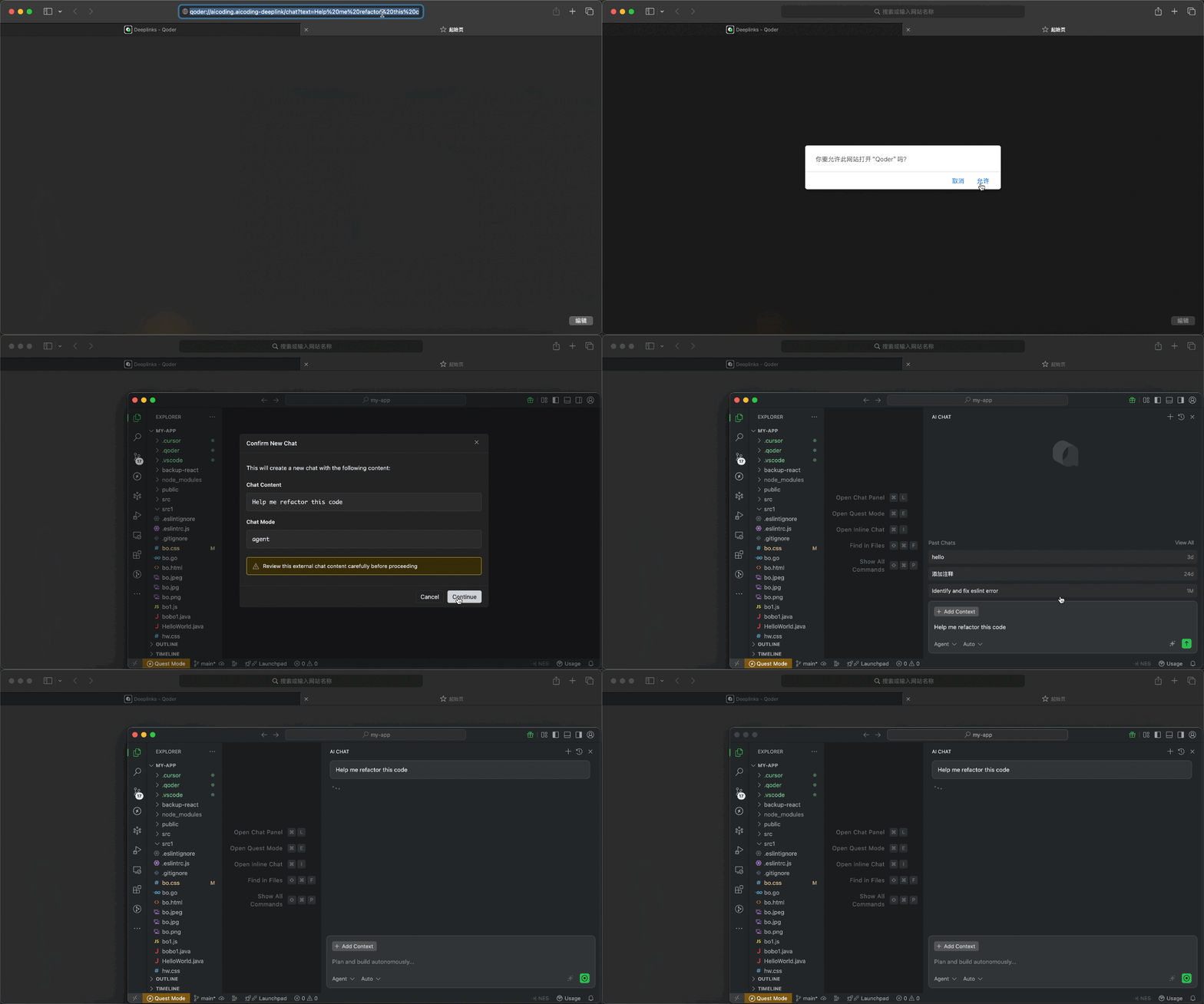
Deeplinks are a navigation mechanism based on a custom URL that allows you to launch Qoder Desktop directly from a browser, documentation, terminal, or other external environment—opening a specific page or performing a specific action such as starting a chat, creating a Quest task, importing a rule, or adding an MCP service configuration.
For Deeplinks that involve writing content or importing configurations, Qoder Desktop will display a confirmation dialog for you to review before proceeding. Some Deeplinks also require you to be logged in first.
## URL Format
```
{scheme}://{host}/{path}?{parameters}
```
| Component | Description | Example |
| ------------ | ---------------------------- | -------------------------------------------------- |
| `scheme` | Protocol | `qoder` |
| `host` | Deeplinks handler identifier | `aicoding.aicoding-deeplink` |
| `path` | Action path | `/chat`, `/quest`, `/rule`, `/command`, `/mcp/add` |
| `parameters` | URL query parameters | `text=hello&mode=agent` |
## Available Deeplink Types
| Path | Description | Login Required |
| ---------- | --------------------- | -------------- |
| `/chat` | Create Chat | Yes |
| `/quest` | Create Quest task | Yes |
| `/rule` | Create rule | No |
| `/command` | Create custom command | No |
| `/mcp/add` | Add MCP service | No |
***
## Create Chat /chat
Open a chat session directly via a link. When opening the link, Qoder Desktop will first show the content to be brought into the new conversation. After confirmation, it will create a new chat and pre-fill the text into the input box without sending it automatically. You must be logged in before using it.
### URL Format
```
qoder://aicoding.aicoding-deeplink/chat?text={prompt}&mode={mode}&isNewChat={isNewChat}
```
### Parameters
| Parameter | Required | Description |
| ----------- | -------- | ---------------------------------------------------------------------------------------------------- |
| `text` | Yes | The prompt content to pre-fill |
| `mode` | No | Chat mode: `agent`, `ask`, `chat`, or `experts` when Experts is enabled. `ask` is handled as `chat`. |
| `isNewChat` | No | Whether to create a new chat. Defaults to `true`; set to `false` to pre-fill the current chat. |
### Example
```
qoder://aicoding.aicoding-deeplink/chat?text=Help%20me%20refactor%20this%20code&mode=agent
```
### Generate Link Code
```typescript theme={null}
function generateChatDeeplink(text: string, mode?: 'agent' | 'ask' | 'chat' | 'experts', isNewChat?: boolean): string {
if (!text) {
throw new Error('Missing required parameter: text');
}
const url = new URL('qoder://aicoding.aicoding-deeplink/chat');
url.searchParams.set('text', text);
if (mode) {
url.searchParams.set('mode', mode);
}
if (isNewChat !== undefined) {
url.searchParams.set('isNewChat', String(isNewChat));
}
return url.toString();
}
// Example
const deeplink = generateChatDeeplink('Help me refactor this code', 'agent');
console.log(deeplink);
// qoder://aicoding.aicoding-deeplink/chat?text=Help+me+refactor+this+code&mode=agent
```
```python theme={null}
from urllib.parse import urlencode
def generate_chat_deeplink(text: str, mode: str = None, is_new_chat: bool = None) -> str:
if not text:
raise ValueError('Missing required parameter: text')
params = {'text': text}
if mode:
params['mode'] = mode
if is_new_chat is not None:
params['isNewChat'] = str(is_new_chat).lower()
return f"qoder://aicoding.aicoding-deeplink/chat?{urlencode(params)}"
# Example
deeplink = generate_chat_deeplink('Help me refactor this code', 'agent')
print(deeplink)
```
***
## Create Quest Task /quest
Open or focus the independent Quest window and pre-fill a new Quest draft. When opening the link, you can review the task description and execution mode before deciding whether to proceed. You must be logged in before using it.
### URL Format
```
qoder://aicoding.aicoding-deeplink/quest?text={description}&agentClass={agentClass}
```
### Parameters
| Parameter | Required | Description |
| ------------ | -------- | --------------------------------------------------------- |
| `text` | Yes | Task description |
| `agentClass` | No | Execution mode: `LocalAgent` (default) or `LocalWorktree` |
#### Execution Modes
| Mode | Description |
| --------------- | -------------------------------- |
| `LocalAgent` | Execute in current workspace |
| `LocalWorktree` | Execute in isolated git worktree |
### Example
```
qoder://aicoding.aicoding-deeplink/quest?text=Implement%20user%20authentication%20with%20JWT&agentClass=LocalWorktree
```
### Generate Link Code
```typescript theme={null}
type AgentClass = 'LocalAgent' | 'LocalWorktree';
function generateQuestDeeplink(text: string, agentClass?: AgentClass): string {
if (!text) {
throw new Error('Missing required parameter: text');
}
const url = new URL('qoder://aicoding.aicoding-deeplink/quest');
url.searchParams.set('text', text);
if (agentClass) {
url.searchParams.set('agentClass', agentClass);
}
return url.toString();
}
// Example
const deeplink = generateQuestDeeplink('Implement user authentication with JWT', 'LocalWorktree');
console.log(deeplink);
```
```python theme={null}
from urllib.parse import urlencode
def generate_quest_deeplink(text: str, agent_class: str = None) -> str:
if not text:
raise ValueError('Missing required parameter: text')
params = {'text': text}
if agent_class:
params['agentClass'] = agent_class
return f"qoder://aicoding.aicoding-deeplink/quest?{urlencode(params)}"
# Example
deeplink = generate_quest_deeplink('Implement user authentication with JWT', 'LocalWorktree')
print(deeplink)
```
***
## Create Rule /rule
Import rules to guide AI behavior via a link. Rules can define coding standards, project conventions, or specific instructions for AI responses. When opening the link, you can first review the rule name and content before deciding whether to import it; upon confirmation, the corresponding rule will be created.
### URL Format
```
qoder://aicoding.aicoding-deeplink/rule?name={ruleName}&text={ruleContent}
```
### Parameters
| Parameter | Required | Description |
| --------- | -------- | ---------------------------- |
| `name` | Yes | Rule name (used as filename) |
| `text` | Yes | Rule content |
### Example
```
qoder://aicoding.aicoding-deeplink/rule?name=typescript-conventions&text=Always%20use%20strict%20TypeScript%20types
```
### Generate Link Code
```typescript theme={null}
function generateRuleDeeplink(name: string, text: string): string {
if (!name || !text) {
throw new Error('Missing required parameters: name and text');
}
const url = new URL('qoder://aicoding.aicoding-deeplink/rule');
url.searchParams.set('name', name);
url.searchParams.set('text', text);
return url.toString();
}
// Example
const deeplink = generateRuleDeeplink(
'typescript-conventions',
`Always use strict TypeScript types.
Avoid using 'any' type.
Prefer interfaces over type aliases for object shapes.`
);
console.log(deeplink);
```
```python theme={null}
from urllib.parse import urlencode
def generate_rule_deeplink(name: str, text: str) -> str:
if not name or not text:
raise ValueError('Missing required parameters: name and text')
params = {'name': name, 'text': text}
return f"qoder://aicoding.aicoding-deeplink/rule?{urlencode(params)}"
# Example
deeplink = generate_rule_deeplink(
'typescript-conventions',
"""Always use strict TypeScript types.
Avoid using 'any' type.
Prefer interfaces over type aliases for object shapes."""
)
print(deeplink)
```
***
## Add MCP Service /mcp/add
Quickly add MCP (Model Context Protocol) service configurations via a link. MCP services extend AI capabilities by providing additional tools and context sources. When opening the link, Qoder Desktop will first display the service information to be added and open the MCP settings page, allowing you to review and confirm simultaneously.
### URL Format
```
qoder://aicoding.aicoding-deeplink/mcp/add?name={serverName}&config={base64EncodedConfig}
```
### Parameters
| Parameter | Required | Description |
| --------- | -------- | --------------------------------------------- |
| `name` | Yes | MCP service name |
| `config` | Yes | Base64 encoded MCP service JSON configuration |
> Note: The configuration must contain either `command` or `url`; if the name already exists, it cannot be added again.
### Example
```
qoder://aicoding.aicoding-deeplink/mcp/add?name=postgres&config=JTdCJTIyY29tbWFuZCUyMiUzQSUyMm5weCUyMiUyQyUyMmFyZ3MlMjIlM0ElNUIlMjIteSUyMiUyQyUyMiU0MG1vZGVsY29udGV4dHByb3RvY29sJTJGc2VydmVyLXBvc3RncmVzJTIyJTJDJTIycG9zdGdyZXNxbCUzQSUyRiUyRmxvY2FsaG9zdCUyRm15ZGIlMjIlNUQlN0Q%3D
```
### Generate Link Code
MCP service JSON configuration encoding Process:
1. Create the configuration JSON object
2. Serialize with `JSON.stringify()`
3. URL encode with `encodeURIComponent()`
4. Base64 encode with `btoa()`
5. URL encode the result with `encodeURIComponent()`
```typescript theme={null}
interface McpServerConfig {
command?: string;
args?: string[];
url?: string;
env?: Record;
}
function generateMcpAddDeeplink(name: string, config: McpServerConfig): string {
if (!name) {
throw new Error('Missing required parameter: name');
}
if (!config) {
throw new Error('Missing required parameter: config');
}
if (!config.command && !config.url) {
throw new Error('Config must contain either "command" or "url"');
}
const configJson = JSON.stringify(config);
const base64Config = btoa(encodeURIComponent(configJson));
const encodedName = encodeURIComponent(name);
const encodedConfig = encodeURIComponent(base64Config);
return `qoder://aicoding.aicoding-deeplink/mcp/add?name=${encodedName}&config=${encodedConfig}`;
}
// Example 1: PostgreSQL MCP Server
const postgresDeeplink = generateMcpAddDeeplink('postgres', {
command: 'npx',
args: ['-y', '@modelcontextprotocol/server-postgres', 'postgresql://localhost/mydb']
});
console.log(postgresDeeplink);
// Example 2: GitHub MCP Server with environment variables
const githubDeeplink = generateMcpAddDeeplink('github', {
command: 'npx',
args: ['-y', '@modelcontextprotocol/server-github'],
env: { GITHUB_PERSONAL_ACCESS_TOKEN: '' }
});
console.log(githubDeeplink);
// Example 3: HTTP-based MCP Server
const httpDeeplink = generateMcpAddDeeplink('custom-server', {
url: 'https://mcp.example.com/sse'
});
console.log(httpDeeplink);
```
```python theme={null}
import json
import base64
from urllib.parse import quote
def generate_mcp_add_deeplink(name: str, config: dict) -> str:
if not name:
raise ValueError('Missing required parameter: name')
if not config:
raise ValueError('Missing required parameter: config')
if 'command' not in config and 'url' not in config:
raise ValueError('Config must contain either "command" or "url"')
config_json = json.dumps(config)
config_encoded = quote(config_json)
config_base64 = base64.b64encode(config_encoded.encode()).decode()
encoded_name = quote(name)
encoded_config = quote(config_base64)
return f"qoder://aicoding.aicoding-deeplink/mcp/add?name={encoded_name}&config={encoded_config}"
# Example 1: PostgreSQL MCP Server
postgres_deeplink = generate_mcp_add_deeplink('postgres', {
'command': 'npx',
'args': ['-y', '@modelcontextprotocol/server-postgres', 'postgresql://localhost/mydb']
})
print(postgres_deeplink)
# Example 2: GitHub MCP Server with environment variables
github_deeplink = generate_mcp_add_deeplink('github', {
'command': 'npx',
'args': ['-y', '@modelcontextprotocol/server-github'],
'env': { 'GITHUB_PERSONAL_ACCESS_TOKEN': '' }
})
print(github_deeplink)
```
***
***
## Create Command /command
Quickly create custom commands via links, ideal for distributing common prompt templates, project operation guides, or team-agreed commands. When opening the link, Qoder Desktop will first display the command name, scope, description, and content before creating it upon confirmation.
### URL Format
```
qoder://aicoding.aicoding-deeplink/command?name={name}&text={content}&description={description}&scope={scope}
```
### Parameters
| Parameter | Required | Description |
| ------------- | -------- | ------------------------------------------------------------------------------------ |
| `name` | Yes | Command name, must only contain lowercase letters, numbers, hyphens, and underscores |
| `text` | Yes | Command content |
| `description` | No | Command description |
| `scope` | No | Scope: `user` or `project`, default is `user` |
#### Scope
| Scope | Description |
| --------- | -------------------------------------------------------- |
| `user` | Adds only to the current user environment |
| `project` | Adds to the current workspace, suitable for team sharing |
### Example
```
qoder://aicoding.aicoding-deeplink/command?name=review_pr&text=Please%20help%20me%20review%20this%20PR&description=Review%20pull%20request&scope=user
```
### Generate Link Code
```typescript theme={null}
type CommandScope = 'user' | 'project';
function generateCommandDeeplink(
name: string,
text: string,
description?: string,
scope: CommandScope = 'user'
): string {
if (!name) {
throw new Error('Missing required parameter: name');
}
if (!text) {
throw new Error('Missing required parameter: text');
}
if (!/^[a-z0-9_-]+$/.test(name)) {
throw new Error('Command name can only contain lowercase letters, numbers, hyphens and underscores');
}
const url = new URL('qoder://aicoding.aicoding-deeplink/command');
url.searchParams.set('name', name);
url.searchParams.set('text', text);
if (description) {
url.searchParams.set('description', description);
}
url.searchParams.set('scope', scope);
return url.toString();
}
// Example
const deeplink = generateCommandDeeplink(
'review_pr',
'Please help me review this PR',
'Review pull request'
);
console.log(deeplink);
```
```python theme={null}
import re
from urllib.parse import urlencode
def generate_command_deeplink(name: str, text: str, description: str = None, scope: str = 'user') -> str:
if not name:
raise ValueError('Missing required parameter: name')
if not text:
raise ValueError('Missing required parameter: text')
if not re.match(r'^[a-z0-9_-]+$', name):
raise ValueError('Command name can only contain lowercase letters, numbers, hyphens and underscores')
if scope not in ('user', 'project'):
raise ValueError('Invalid scope value. Valid values are: user, project')
params = {
'name': name,
'text': text,
'scope': scope,
}
if description:
params['description'] = description
return f"qoder://aicoding.aicoding-deeplink/command?{urlencode(params)}"
# Example
deeplink = generate_command_deeplink('review_pr', 'Please help me review this PR', 'Review pull request')
print(deeplink)
```
### Usage Notes
1. After clicking the link, Qoder Desktop will first display the command information for your confirmation.
2. `name` cannot be empty and can only use lowercase letters, numbers, hyphens, and underscores.
3. `scope=project` requires you to have a workspace currently open; otherwise, it cannot be created.
4. Commands with the same name cannot be created repeatedly.
***
## Security Considerations
> **Important**: Always review Deeplinks content before clicking.
* **Never include sensitive data**: Do not embed API keys, passwords, or proprietary code in Deeplinks
* **Verify the source**: Only click Deeplinks from trusted sources
* **Review before confirming**: Qoder Desktop always shows a confirmation dialog - carefully review the content before proceeding
* **No automatic execution**: Deeplinks never execute automatically; user confirmation is always required
## Troubleshooting
| Issue | Possible Cause | Solution |
| ------------------------------- | -------------------------------- | ------------------------------------------------------------------------------------ |
| "Unregistered deeplink path" | Unsupported deeplink path | Check if the path is supported and ensure Qoder version is 0.2.21 or above |
| "Missing required parameter" | Parameter not provided | Check that all required parameters are included in the URL |
| "Invalid JSON config" | Malformed JSON | Validate JSON structure before encoding |
| "Quest Mode is disabled" | Quest feature not enabled | Enable Quest Mode in Settings |
| Login prompt appears | Deeplink requires authentication | Sign in to your account first |
| "Invalid Base64 encoded config" | Incorrect MCP config encoding | Ensure correct encoding order: JSON → encodeURIComponent → btoa → encodeURIComponent |
## URL Length Limits
Deeplink URLs should not exceed **8,000 characters**. For longer content, consider:
* Shortening the prompt or rule content
* Using external references instead of inline content
* Splitting into multiple deeplinks