> ## Documentation Index
> Fetch the complete documentation index at: https://docs.qoder.com/llms.txt
> Use this file to discover all available pages before exploring further.
# Expert Kits
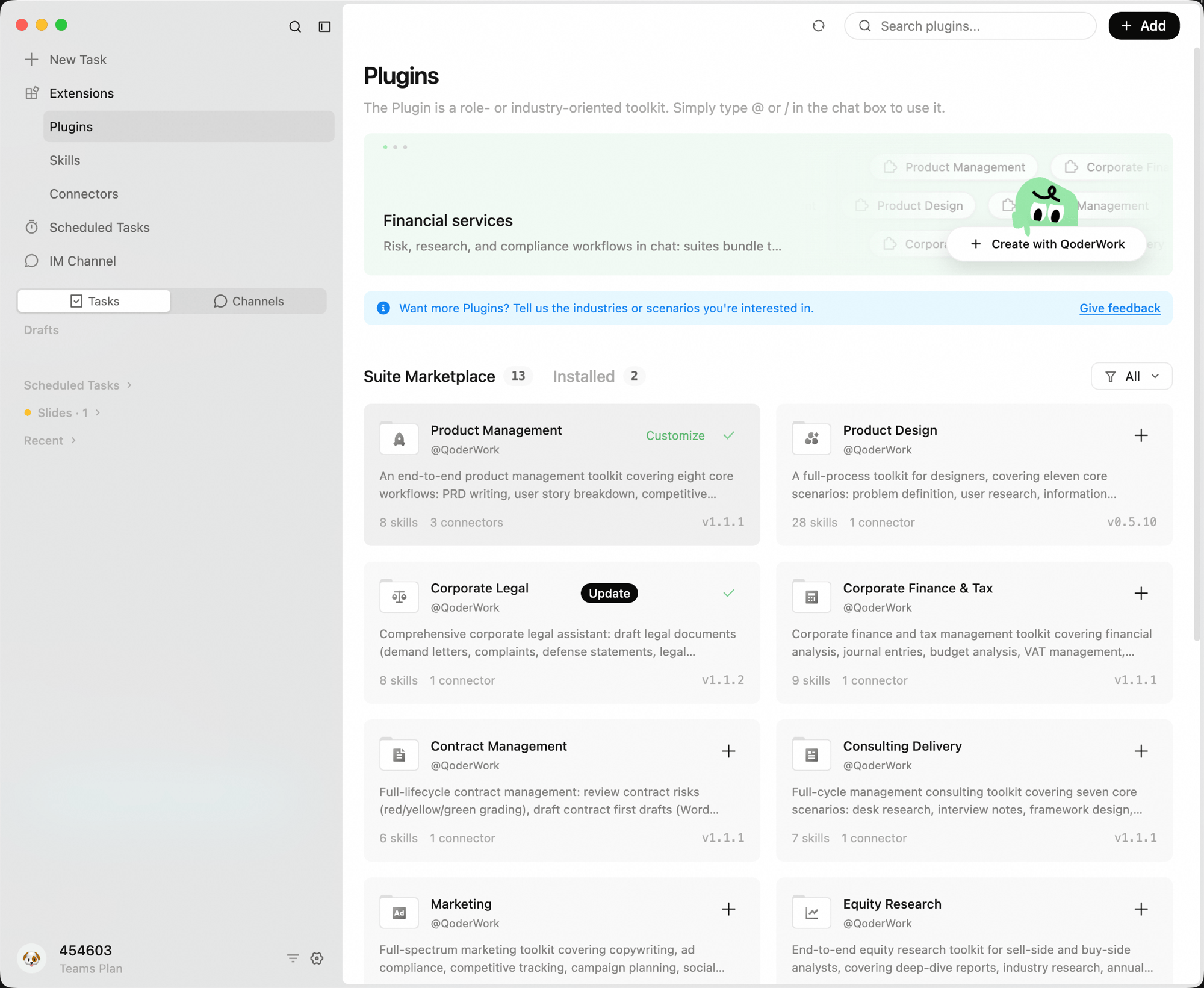
Traditional AI is a generalist — it can chat about anything but truly excels at nothing. Expert Kits change that. They package an industry's professional knowledge, workflows, and judgment criteria into AI, turning it into a domain expert.
Install a legal kit, and AI can review contracts clause by clause, flag compliance risks, and rate them red/yellow/green — it's not "helping you look things up," it's doing the work of a legal specialist. Install a finance kit, and AI can build financial models and analyze key metrics. Install a product management kit, and AI can write PRDs, organize user feedback, and track requirements.
**Expert Kits don't just connect AI to tools — they give AI professional-grade capabilities for specific roles.**
 ## Kits vs. Skills
If you already use [Skills](/qoderwork/skills), the key difference is:
[Skills](/qoderwork/skills) address "how AI performs a specific task" — packaging a professional methodology or workflow into a reusable skill unit so AI can learn how to handle a particular type of work.
Expert Kits address "how to unify an entire team on the same AI-powered workflow" — combining multiple Skills, data connections, workflows, and output standards into a complete solution package that can be deployed team-wide with a single install.
| Dimension | Skill | Expert Kit |
| :-------------------- | :-------------------------------------------------------- | :----------------------------------------------------------------------------------- |
| **Definition** | A standalone professional knowledge/methodology unit | A complete work solution package (Skills + data connections + workflows + standards) |
| **Problem it solves** | Teaching AI a professional skill | Enabling a team to use the same AI-powered work solution |
| **Created by** | Individual users or experts, lower barrier | Industry experts or teams, requires complete workflow design |
| **Used by** | Primarily individuals | Teams — expert configures once, members install with one click |
| **Typical scenario** | Exploration phase: validating whether a methodology works | Distribution phase: rolling out a proven approach to the entire team |
Skills are suited for individual exploration and methodology validation. Expert Kits are suited for standardizing proven approaches and distributing them across a team. The two typically follow a progression: validate best practices with Skills first, then package them into Expert Kits for team-wide rollout.
## Custom Kits
Every enterprise has different workflows, standards, and tool chains — no pre-built set can cover every scenario. The real value of Expert Kits is that **every organization can package their own.**
Domain experts within your company package their role's workflows, judgment criteria, and quality standards into an Expert Kit. Everyone else installs it with one click and immediately gains the same capabilities. No training, no configuration, no technical knowledge required.
### Let QoderWork Create One for You
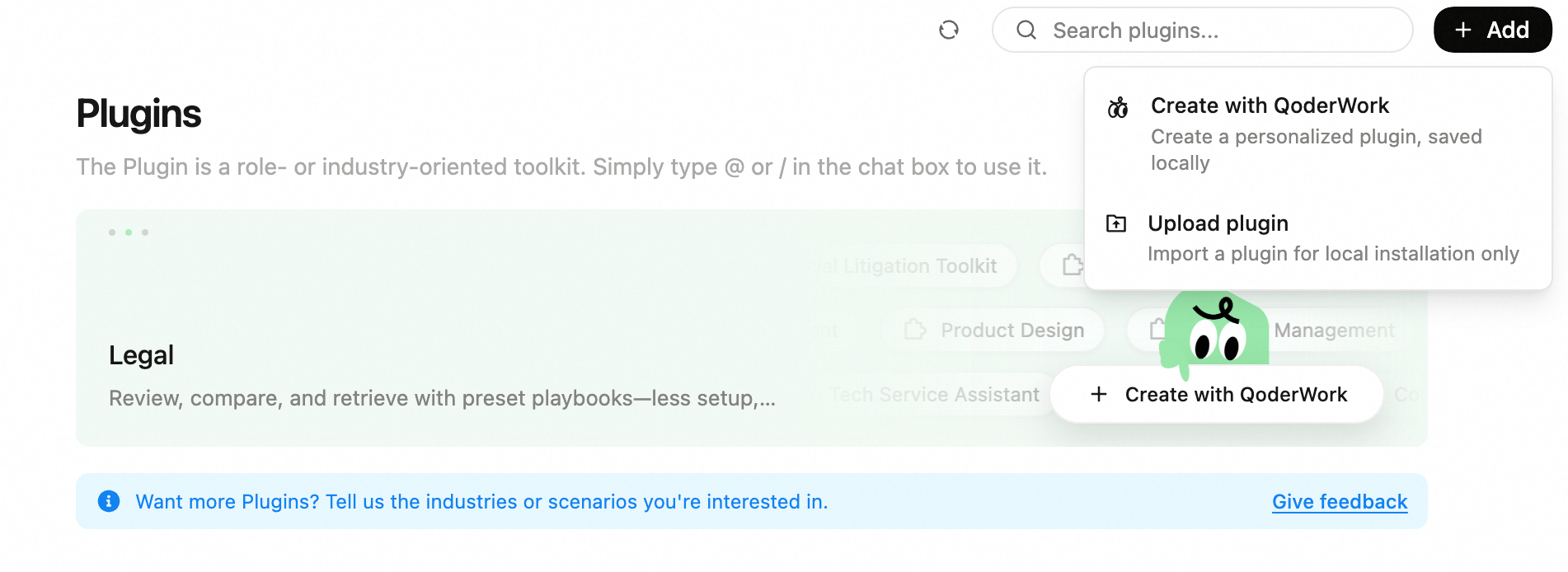
On the Expert Kits page, click **+ Add** in the top-right corner and select **Create with QoderWork**. Describe the kit functionality and scenarios in natural language, and QoderWork will automatically generate the kit structure and skill configuration.
### Share a Kit
Click **Share This Kit** in the top-right corner of the kit detail page to download the kit as a `.zip` file. Send this file to colleagues — they can install it via **Upload plugin** to use the same kit immediately, enabling quick team distribution.
### Upload a Kit Manually
If you already have a kit package (e.g., shared by a colleague or built on your own), upload and install it directly:
Package your kit as a `.zip` file. The ZIP must contain one of the following structures:
* `.qoder-plugin/plugin.json`
* `.claude-plugin/plugin.json`
The `plugin.json` file must include a `name` field.
Click **+ Add** in the top-right corner of the Expert Kits page, then select **Upload plugin**.
## Kits vs. Skills
If you already use [Skills](/qoderwork/skills), the key difference is:
[Skills](/qoderwork/skills) address "how AI performs a specific task" — packaging a professional methodology or workflow into a reusable skill unit so AI can learn how to handle a particular type of work.
Expert Kits address "how to unify an entire team on the same AI-powered workflow" — combining multiple Skills, data connections, workflows, and output standards into a complete solution package that can be deployed team-wide with a single install.
| Dimension | Skill | Expert Kit |
| :-------------------- | :-------------------------------------------------------- | :----------------------------------------------------------------------------------- |
| **Definition** | A standalone professional knowledge/methodology unit | A complete work solution package (Skills + data connections + workflows + standards) |
| **Problem it solves** | Teaching AI a professional skill | Enabling a team to use the same AI-powered work solution |
| **Created by** | Individual users or experts, lower barrier | Industry experts or teams, requires complete workflow design |
| **Used by** | Primarily individuals | Teams — expert configures once, members install with one click |
| **Typical scenario** | Exploration phase: validating whether a methodology works | Distribution phase: rolling out a proven approach to the entire team |
Skills are suited for individual exploration and methodology validation. Expert Kits are suited for standardizing proven approaches and distributing them across a team. The two typically follow a progression: validate best practices with Skills first, then package them into Expert Kits for team-wide rollout.
## Custom Kits
Every enterprise has different workflows, standards, and tool chains — no pre-built set can cover every scenario. The real value of Expert Kits is that **every organization can package their own.**
Domain experts within your company package their role's workflows, judgment criteria, and quality standards into an Expert Kit. Everyone else installs it with one click and immediately gains the same capabilities. No training, no configuration, no technical knowledge required.
### Let QoderWork Create One for You
On the Expert Kits page, click **+ Add** in the top-right corner and select **Create with QoderWork**. Describe the kit functionality and scenarios in natural language, and QoderWork will automatically generate the kit structure and skill configuration.
### Share a Kit
Click **Share This Kit** in the top-right corner of the kit detail page to download the kit as a `.zip` file. Send this file to colleagues — they can install it via **Upload plugin** to use the same kit immediately, enabling quick team distribution.
### Upload a Kit Manually
If you already have a kit package (e.g., shared by a colleague or built on your own), upload and install it directly:
Package your kit as a `.zip` file. The ZIP must contain one of the following structures:
* `.qoder-plugin/plugin.json`
* `.claude-plugin/plugin.json`
The `plugin.json` file must include a `name` field.
Click **+ Add** in the top-right corner of the Expert Kits page, then select **Upload plugin**.
 Drag and drop the `.zip` file into the upload area, or click to select it.
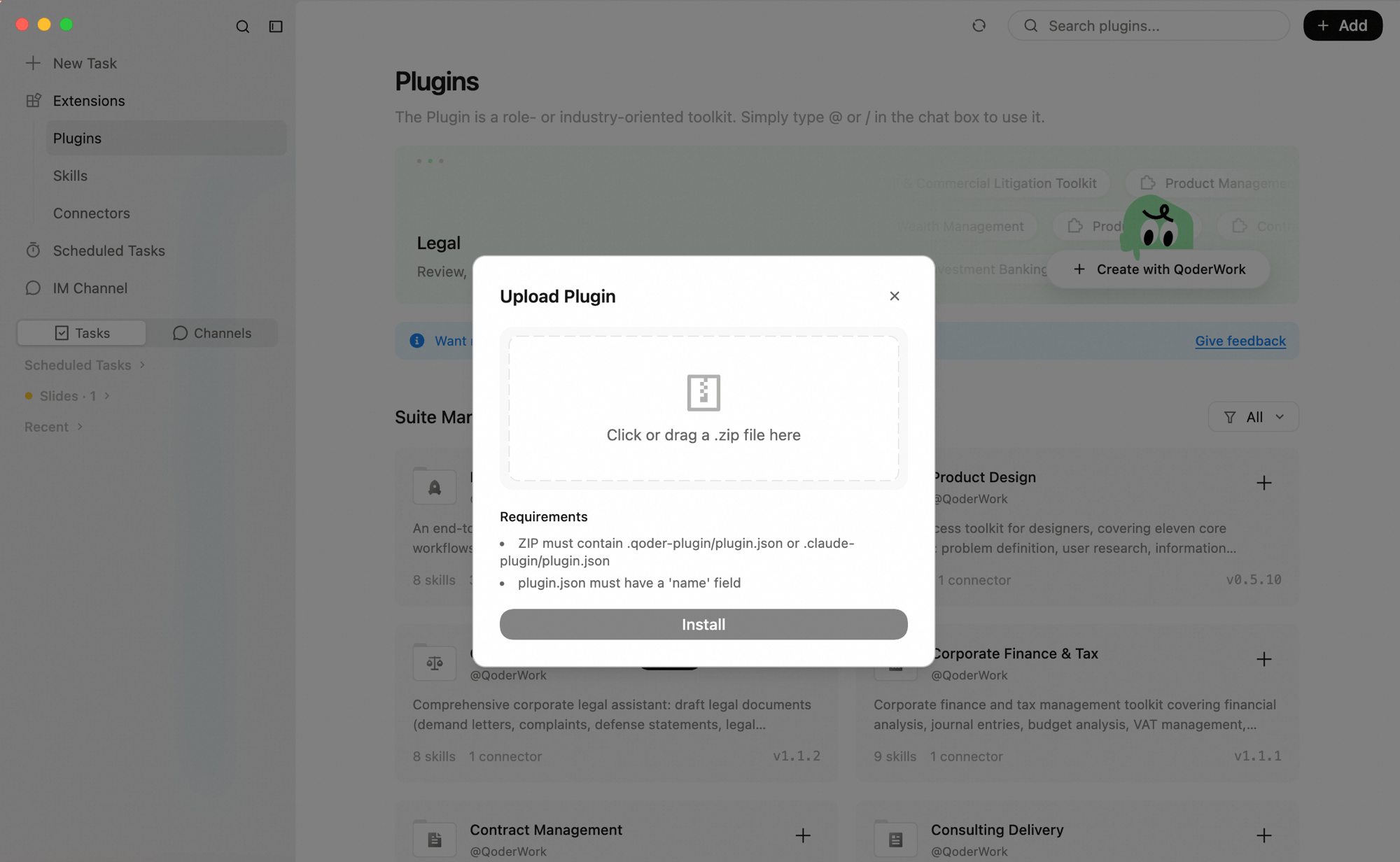 Click **Install**. The kit is now available locally.
### Customize an Installed Kit
On the Expert Kits page, find an installed kit — a **Customize** button appears in the top-right corner of its card.
Click **Install**. The kit is now available locally.
### Customize an Installed Kit
On the Expert Kits page, find an installed kit — a **Customize** button appears in the top-right corner of its card.
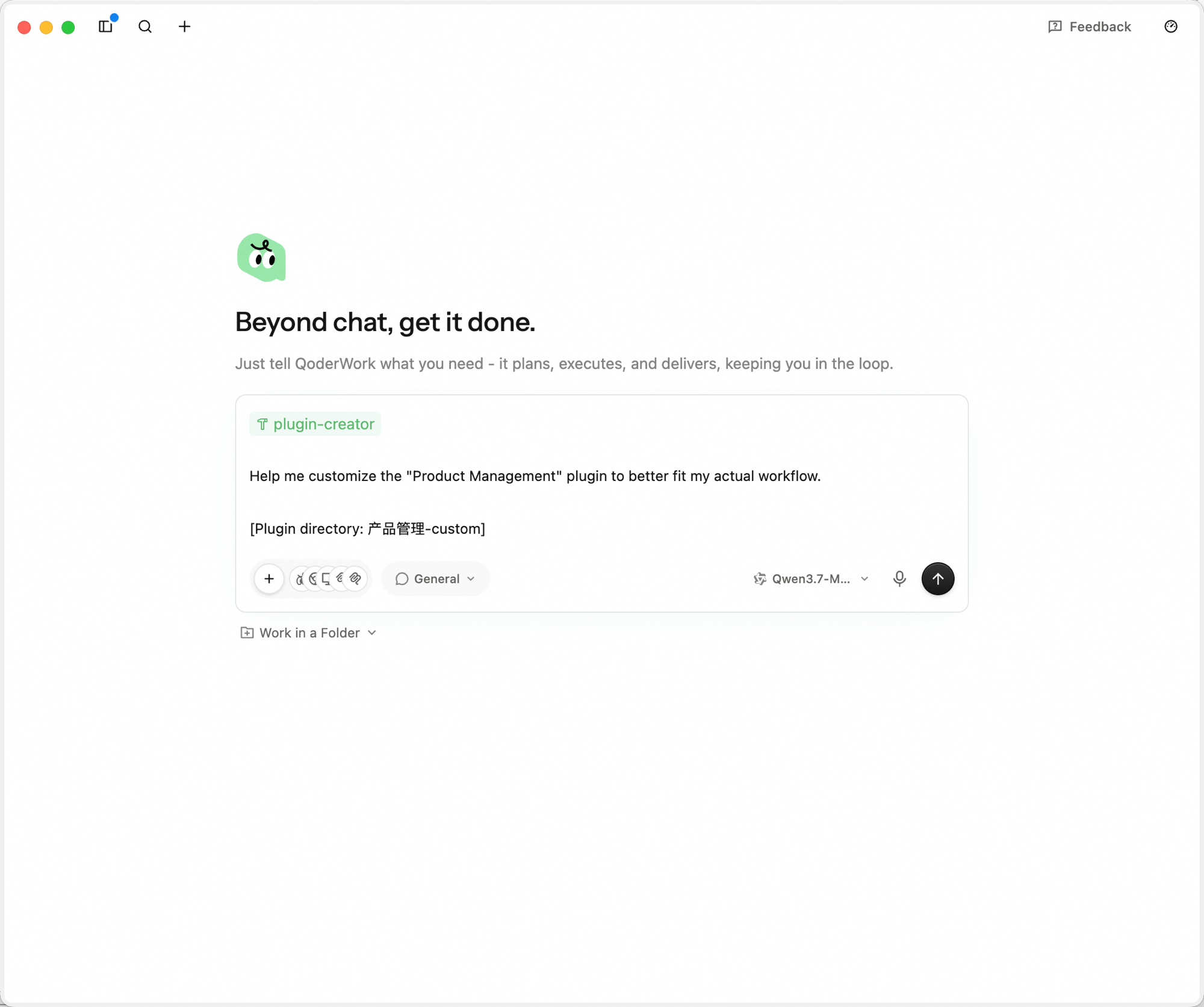
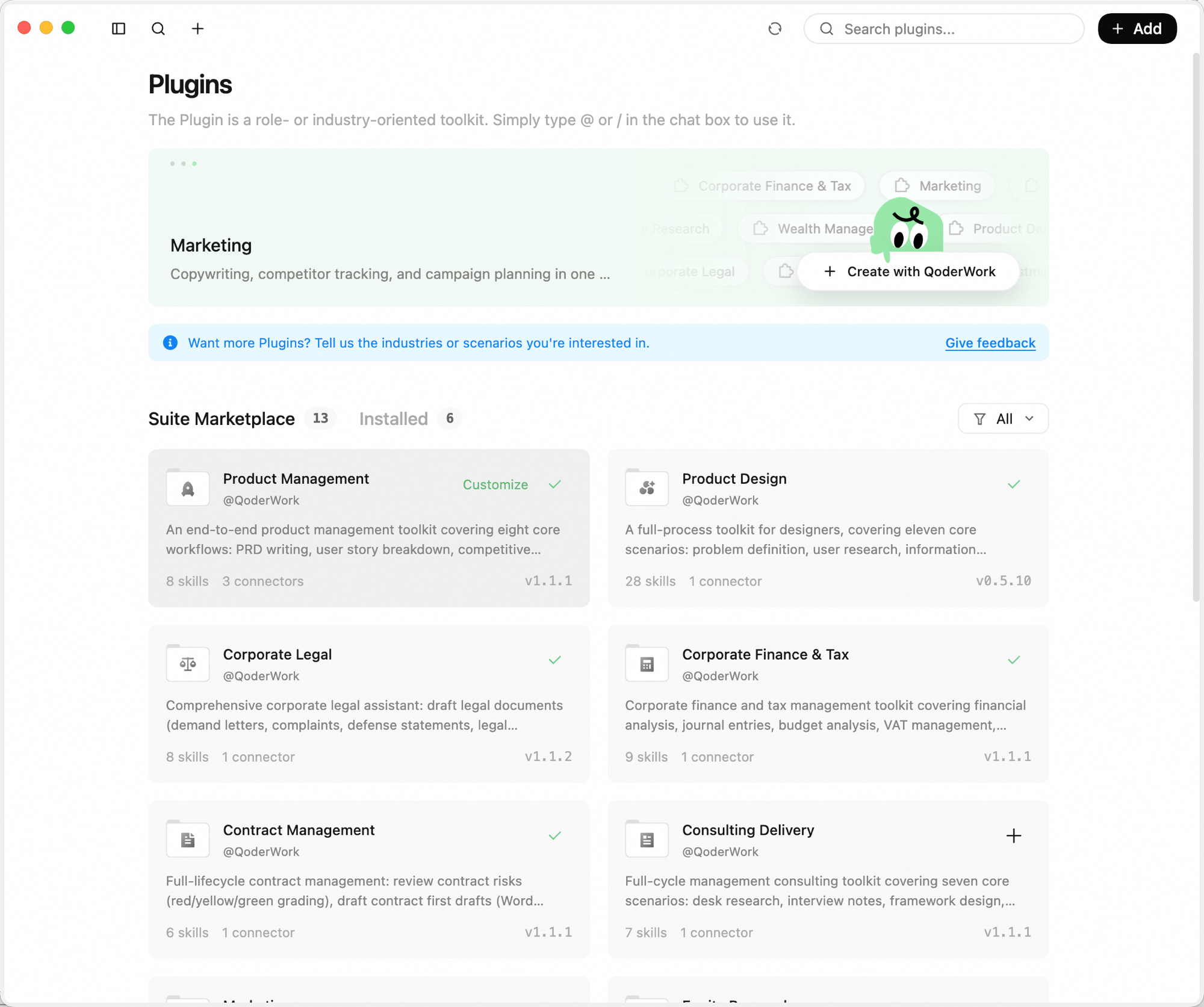 Click it and QoderWork opens a new task pre-loaded with the `plugin-creator` skill and the kit's configuration directory. Describe the changes you want in plain language and AI modifies the kit directly.
 ## Built-in Kits
QoderWork's first wave covers finance, legal, marketing, HR, and more — 12 industry kits ready to use out of the box:
A full-cycle toolkit for product managers — PRD writing, user story breakdown, competitive analysis, requirement prioritization, user feedback analysis, product metrics review, and roadmap updates.
A full-cycle toolkit for designers — problem definition, user research, information architecture, interaction flows, visual guidelines, marketing materials, motion development, design reviews, usability testing, and engineering handoff.
A comprehensive legal assistant — draft legal documents (demand letters, complaints, defense statements, attorney briefs), generate corporate resolutions and charter amendments, case research with win-rate analysis, and more.
Financial and tax management tools — financial analysis, bookkeeping vouchers, budget analysis, VAT management, annual settlement, internal audit, financial statement preparation, and month-end closing.
End-to-end contract lifecycle management — review contract risks (red/yellow/green grading), draft initial contracts (Word output), redline comparison between two versions, NDA quick screening, statute lookup, and contract ledger reminders.
Full-cycle management consulting tools — desk research, interview notes, framework design, report writing, benchmarking, weekly reports, and CEO briefings. Works standalone or enhanced with document collaboration tools.
Full-scenario marketing tools — marketing copy, ad compliance, competitor tracking, campaign planning, social media trending, SEO optimization, campaign analytics, and brand consistency review.
Full-cycle research tools for securities/funds — in-depth reports, industry research, annual report analysis, earnings flash reviews, research notes, morning meeting briefs, research summaries, and comparable company analysis.
Full-service IB assistant — IPO prospectus drafting, M\&A reports, bond offering memorandums, exchange inquiry responses, roadshow materials, and financial modeling.
Full-cycle PE/VC tools — project screening, due diligence checklists, term sheet review, investment committee memos, return modeling, and exit analysis.
Full-scenario wealth management tools — market overview, asset allocation, fund analysis, client reporting, financial planning, and tax planning.
Full-cycle tech service tools connecting both demand and supply sides — requirement mining, research matching, value assessment, solution generation, and full project lifecycle management.
The built-in kit library is continuously expanding. Submit feedback about industries or scenarios you're interested in at the top of the Expert Kits page.
### What's Inside a Kit
Each kit consists of three components:
* **Quick Commands**: Preset commands invoked by typing `/` in the conversation, each mapping to a specific work scenario. For example, the Contract Management kit includes `/Review Contract`, `/NDA Screening`, `/Contract Comparison`, and more.
* **Data Connections**: Pre-configured external tool connections (e.g., Notion) that provide direct access to associated data when enabled.
* **Knowledge Skills**: Built-in professional skills that define AI's domain expertise, methodology, and judgment criteria for that field.
## Using Kits
In the left sidebar, click **Extensions** → **Expert Kits** to browse all available kits.
Find the kit you want and click the **+** button on the right side of its card to install it. Once installed, the kit's skills are automatically loaded into the conversation capabilities.
Start a new task, type `/` in the chat input, select the kit name, and describe your request.
## Best Practices
**Combine multiple kits**
You can invoke multiple kits in a single conversation. For example, use both "Contract Management" and "Corporate Legal" when handling contracts, so legal review and contract generation happen in the same workflow.
**From Skill exploration to kit distribution**
If your team is just starting with AI, begin with Skills for small-scale validation — let a few people test and find the best methodology and tool combinations. Once proven, package the validated approach into an Expert Kit for the entire team: one person configures, everyone reuses.
## Next Steps
Extend QoderWork capabilities with Skills
Connect browser, calendar, Microsoft 365, DingTalk, and more
Real-world workflows using expert kits
## Built-in Kits
QoderWork's first wave covers finance, legal, marketing, HR, and more — 12 industry kits ready to use out of the box:
A full-cycle toolkit for product managers — PRD writing, user story breakdown, competitive analysis, requirement prioritization, user feedback analysis, product metrics review, and roadmap updates.
A full-cycle toolkit for designers — problem definition, user research, information architecture, interaction flows, visual guidelines, marketing materials, motion development, design reviews, usability testing, and engineering handoff.
A comprehensive legal assistant — draft legal documents (demand letters, complaints, defense statements, attorney briefs), generate corporate resolutions and charter amendments, case research with win-rate analysis, and more.
Financial and tax management tools — financial analysis, bookkeeping vouchers, budget analysis, VAT management, annual settlement, internal audit, financial statement preparation, and month-end closing.
End-to-end contract lifecycle management — review contract risks (red/yellow/green grading), draft initial contracts (Word output), redline comparison between two versions, NDA quick screening, statute lookup, and contract ledger reminders.
Full-cycle management consulting tools — desk research, interview notes, framework design, report writing, benchmarking, weekly reports, and CEO briefings. Works standalone or enhanced with document collaboration tools.
Full-scenario marketing tools — marketing copy, ad compliance, competitor tracking, campaign planning, social media trending, SEO optimization, campaign analytics, and brand consistency review.
Full-cycle research tools for securities/funds — in-depth reports, industry research, annual report analysis, earnings flash reviews, research notes, morning meeting briefs, research summaries, and comparable company analysis.
Full-service IB assistant — IPO prospectus drafting, M\&A reports, bond offering memorandums, exchange inquiry responses, roadshow materials, and financial modeling.
Full-cycle PE/VC tools — project screening, due diligence checklists, term sheet review, investment committee memos, return modeling, and exit analysis.
Full-scenario wealth management tools — market overview, asset allocation, fund analysis, client reporting, financial planning, and tax planning.
Full-cycle tech service tools connecting both demand and supply sides — requirement mining, research matching, value assessment, solution generation, and full project lifecycle management.
The built-in kit library is continuously expanding. Submit feedback about industries or scenarios you're interested in at the top of the Expert Kits page.
### What's Inside a Kit
Each kit consists of three components:
* **Quick Commands**: Preset commands invoked by typing `/` in the conversation, each mapping to a specific work scenario. For example, the Contract Management kit includes `/Review Contract`, `/NDA Screening`, `/Contract Comparison`, and more.
* **Data Connections**: Pre-configured external tool connections (e.g., Notion) that provide direct access to associated data when enabled.
* **Knowledge Skills**: Built-in professional skills that define AI's domain expertise, methodology, and judgment criteria for that field.
## Using Kits
In the left sidebar, click **Extensions** → **Expert Kits** to browse all available kits.
Find the kit you want and click the **+** button on the right side of its card to install it. Once installed, the kit's skills are automatically loaded into the conversation capabilities.
Start a new task, type `/` in the chat input, select the kit name, and describe your request.
## Best Practices
**Combine multiple kits**
You can invoke multiple kits in a single conversation. For example, use both "Contract Management" and "Corporate Legal" when handling contracts, so legal review and contract generation happen in the same workflow.
**From Skill exploration to kit distribution**
If your team is just starting with AI, begin with Skills for small-scale validation — let a few people test and find the best methodology and tool combinations. Once proven, package the validated approach into an Expert Kit for the entire team: one person configures, everyone reuses.
## Next Steps
Extend QoderWork capabilities with Skills
Connect browser, calendar, Microsoft 365, DingTalk, and more
Real-world workflows using expert kits